Build your cookie banner on the tarteaucitron service catalog
zeste loads the 247 services that tarteaucitron.js supports, such as Google Analytics, YouTube, Matomo and Hotjar, only after the visitor accepts them. You write the banner with your own components in Svelte, React or Vue. On a site without a framework, one <script> tag adds a ready-made banner.
The banner texts exist in 36 languages. The tests check that no request reaches a third party before consent.
Why not keep tarteaucitron’s interface
tarteaucitron.js does the hard work. It knows how to load hundreds of services after consent, and its maintainers keep that list up to date. Its interface is harder to adapt. It generates its own HTML, so making the banner match a site means overriding its CSS, often with !important.
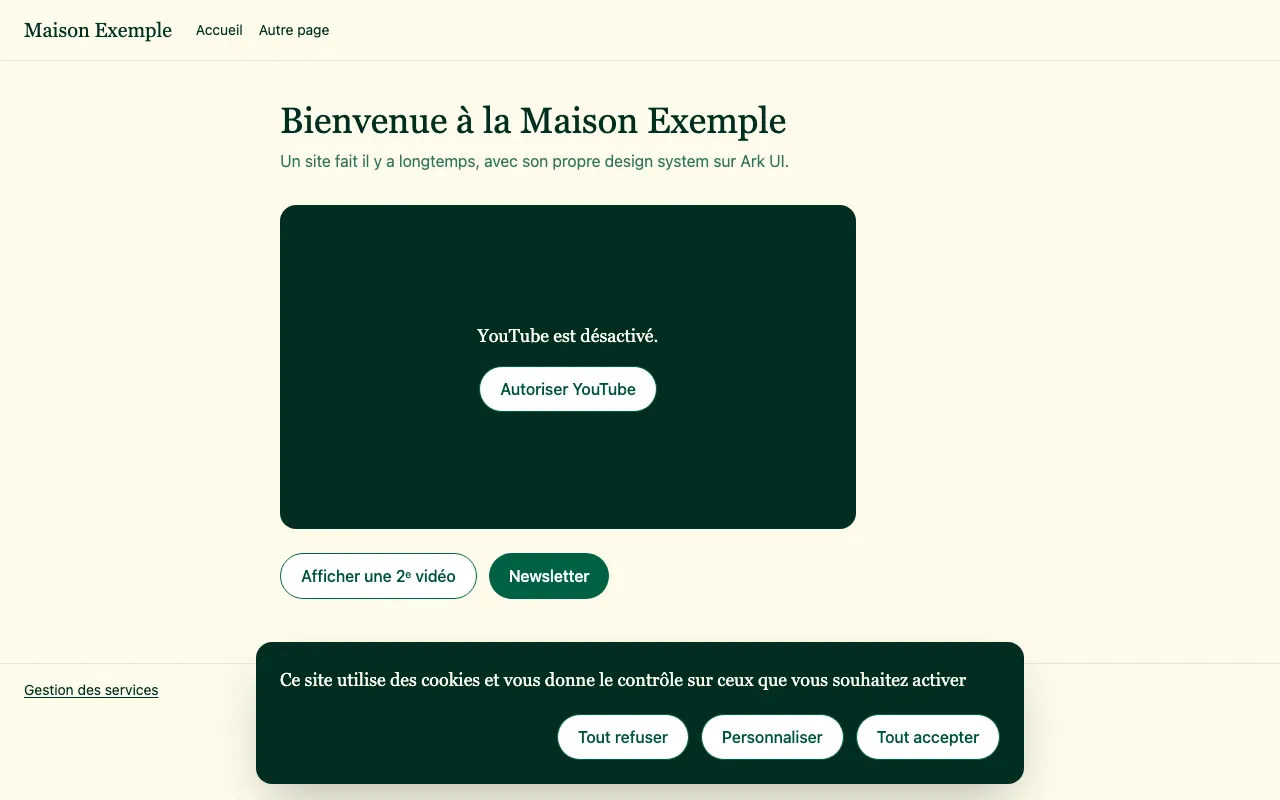
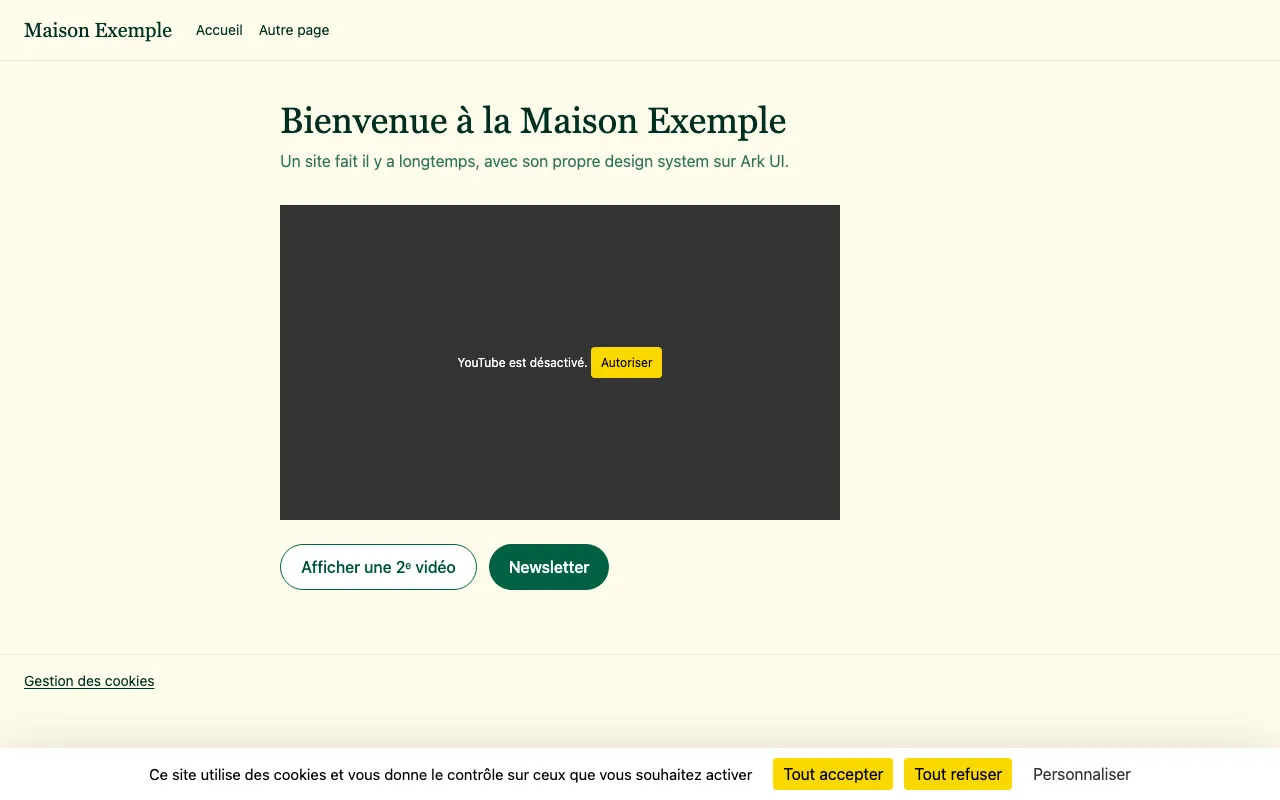 tarteaucitronzeste
On the left, an example site with tarteaucitron’s banner and placeholders.
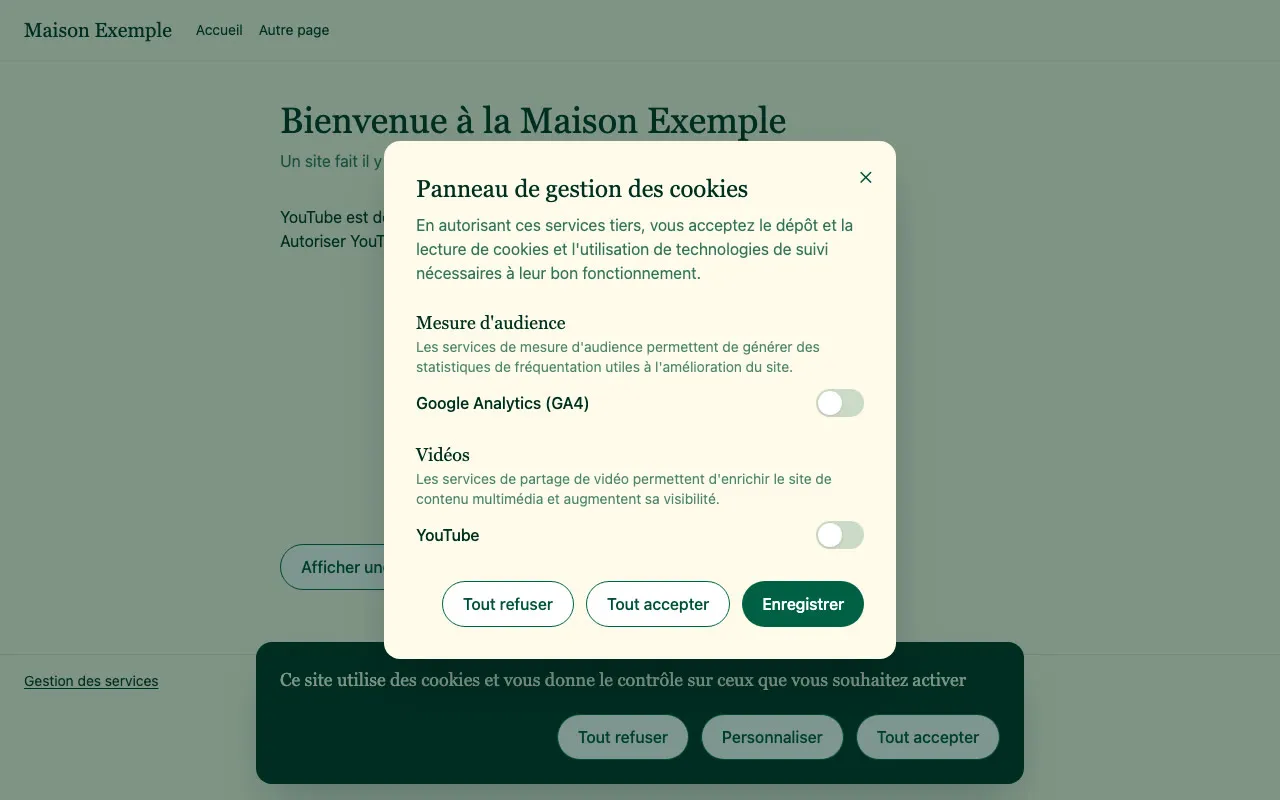
On the right, the same site after moving to zeste. It uses its own banner, buttons and dialog, and loads the same services.
How zeste is built
The engine draws nothing
zeste stores the visitor’s choice in a cookie, loads each script once it is accepted and updates Google Consent Mode. Your components read its state and call its actions.
One module per service
The 247 services come from tarteaucitron.js. You import only the ones you use, and the browser downloads a service’s code when the visitor accepts it.
The components belong to you
npx @zeste/cli add writes a banner and a preferences dialog into your project, with your framework and your UI library. You edit them like any other file.
@zeste/cli add writes a first version.<ConsentBanner> and <ConsentGate>, server rendering and the compliance guard.Set up zeste in four steps
Declare your services
npx @zeste/cli init reads the project and declares the services it already uses. It recognizes a tarteaucitron configuration and the usual Google Analytics, Matomo and Hotjar snippets and YouTube embeds. Its report gives the file and line of each script to remove.
import { gtag, youtube, matomocloud } from '@zeste/services';

export const services = () => [
  gtag({ gtagUa: 'G-XXXXXXX' }),
  youtube(),
  matomocloud({ matomoId: 1, matomoHost: 'https://example.matomo.cloud/' }),
];window.zesteConfig = {
services: {
gtag: { gtagUa: 'G-XXXXXXX' },
youtube: {},
matomocloud: { matomoId: 1, matomoHost: 'https://example.matomo.cloud/' },
},
privacyUrl: '/privacy',
};Read the choice on the server
The server reads the consent cookie, so the first render already shows the right state. A visitor who has already chosen does not see the banner appear and disappear.
import { parseConsentCookie } from '@zeste/svelte';

export const load = ({ cookies }) => ({
  consent: parseConsentCookie(cookies.get('tarteaucitron')),
});import { cookies } from 'next/headers';
import { parseConsentCookie } from '@zeste/react';
export default async function RootLayout({ children }) {
const consent = parseConsentCookie((await cookies()).get('tarteaucitron')?.value);
return <html lang="en"><body><Consent initial={consent}>{children}</Consent></body></html>;
}// useCookie also reads the cookie during server rendering
const cookie = useCookie('tarteaucitron', { decode: (v) => v });
const consent = parseConsentCookie(cookie.value);There is nothing to do here. The script reads the cookie in the browser before it shows anything.
Generate the interface
The CLI detects your framework and UI library. It offers two styles, zeste by default and pelure.
npx @zeste/cli add                  # banner, preferences and placeholder
npx @zeste/cli add --style pelure   # the flat style with thick outlines
The script brings its own banner, preferences, placeholders and a button to change the choice, in the page’s language. Choose the style with style: 'pelure'.
Add zeste to your layout
<script lang="ts">
  import { createZeste, ZesteProvider } from '@zeste/svelte';
  import { messages } from '@zeste/services/i18n/en';
  import { CookieBanner, CookiePreferences } from '$lib/components/zeste';
  import { services } from '$lib/consent';

  let { data, children } = $props();
  const zeste = createZeste({ services: services(), initial: data.consent, messages });
</script>

<ZesteProvider {zeste}>
  {@render children()}
  <CookieBanner />
  <CookiePreferences />
  <!-- a permanent link to change the choice -->
  <button {@attach zeste.actions.openPreferences}>Cookie settings</button>
</ZesteProvider>'use client';
import { useState } from 'react';
import { createZeste, ZesteProvider } from '@zeste/react';
import { messages } from '@zeste/services/i18n/en';
import { CookieBanner, CookiePreferences } from '@/components/zeste';
import { services } from './consent';
export function Consent({ initial, children }) {
const [zeste] = useState(() => createZeste({ services: services(), initial, messages }));
return (
<ZesteProvider zeste={zeste}>
{children}
<CookieBanner />
<CookiePreferences />
{/* a permanent link to change the choice */}
<button {...zeste.actions.openPreferences}>Cookie settings</button>
</ZesteProvider>
);
}<script setup lang="ts">
import { createZeste, parseConsentCookie, ZesteProvider } from '@zeste/vue';
import { messages } from '@zeste/services/i18n/en';
import { CookieBanner, CookiePreferences } from '~/components/zeste';
import { services } from './consent';
const cookie = useCookie('tarteaucitron', { decode: (v) => v });
const zeste = createZeste({ services: services(), initial: parseConsentCookie(cookie.value), messages });
</script>
<template>
<ZesteProvider :zeste="zeste">
<NuxtPage />
<CookieBanner />
<CookiePreferences />
<!-- a permanent link to change the choice -->
<button v-bind="zeste.actions.openPreferences">Cookie settings</button>
</ZesteProvider>
</template><script src="/zeste.config.js"></script>
<script src="/zeste/zeste.js"></script>
<!-- anywhere on the page, a link to change the choice -->
<a href="#zeste">Cookie settings</a>Try the demo
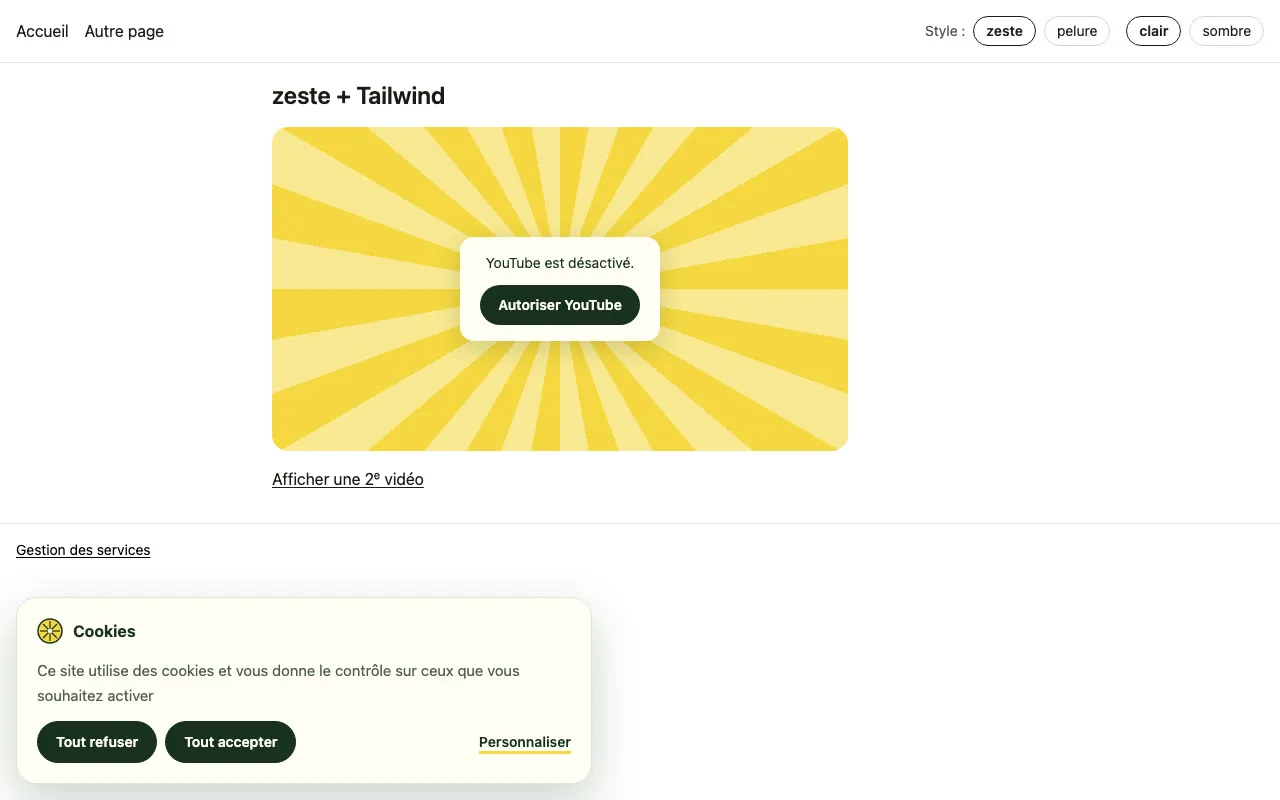
The demo below runs zeste with the components that zeste add generates for Bits UI, Ark UI and shadcn-svelte. The services are simulated. Instead of contacting Google or YouTube, they write what they would have loaded in the log. The demo runs in Svelte, and the React and Vue components pass the same tests. The demo site is in French.
Loading the demo…
Open “Personnaliser” to choose service by service, or click the button on the video placeholder. “Gestion des services” at the bottom of the site reopens the preferences. “Break the banner” shrinks the “Tout refuser” button, and the guard reports it in the log.
Videos and maps wait for consent
<ConsentGate> shows your placeholder until the visitor accepts the service, then shows the video or the map. The server renders the placeholder. Adding a video to the page does not reload the videos already playing.
<ConsentGate service="youtube" embed={{ videoID: 'dQw4w9WgXcQ' }}>
  {#snippet placeholder({ service, allow })}
    <CookiePlaceholder {service} {allow} />
  {/snippet}
</ConsentGate><ConsentGate
service="youtube"
embed={{ videoID: 'dQw4w9WgXcQ' }}
placeholder={(props) => <CookiePlaceholder {...props} />}
/><!-- tarteaucitron’s markup, unchanged -->
<div class="youtube_player" videoID="dQw4w9WgXcQ"></div><ConsentGate service="youtube" :embed="{ videoID: 'dQw4w9WgXcQ' }">
<template #placeholder="props"><CookiePlaceholder v-bind="props" /></template>
</ConsentGate>What zeste enforces
- zeste sends no request to a third party before consent. The tests check this at the browser’s network level for all 247 services. tarteaucitron’s cookieless modes do contact a third party before consent, for example with Matomo Cloud or advanced Consent Mode. They stay off unless you turn them on.
- In the generated banners, “Deny all” and “Accept all” have the same style.
- Nothing is pre-checked in the preferences. A service the visitor did not choose stays refused.
- Visitors can withdraw their consent at any time. zeste then deletes the service’s cookies, puts videos back behind their placeholder and offers to reload the page for scripts already running.
- Google Consent Mode v2 takes one line,
googleConsentMode(). The script version turns it on by default. - Consent lasts 13 months. zeste asks again when you change the list of services.
- The GDPR asks you to be able to show that a visitor consented. zeste gives your code a record of each choice, with the date, the state of each service, your policy version and a random identifier stored in the cookie. You decide where to send it, and zeste sends nothing itself.
Warnings while you develop
In development, zeste checks how your banner actually renders and warns in the console when it breaks a measurable rule. This works with any design system.
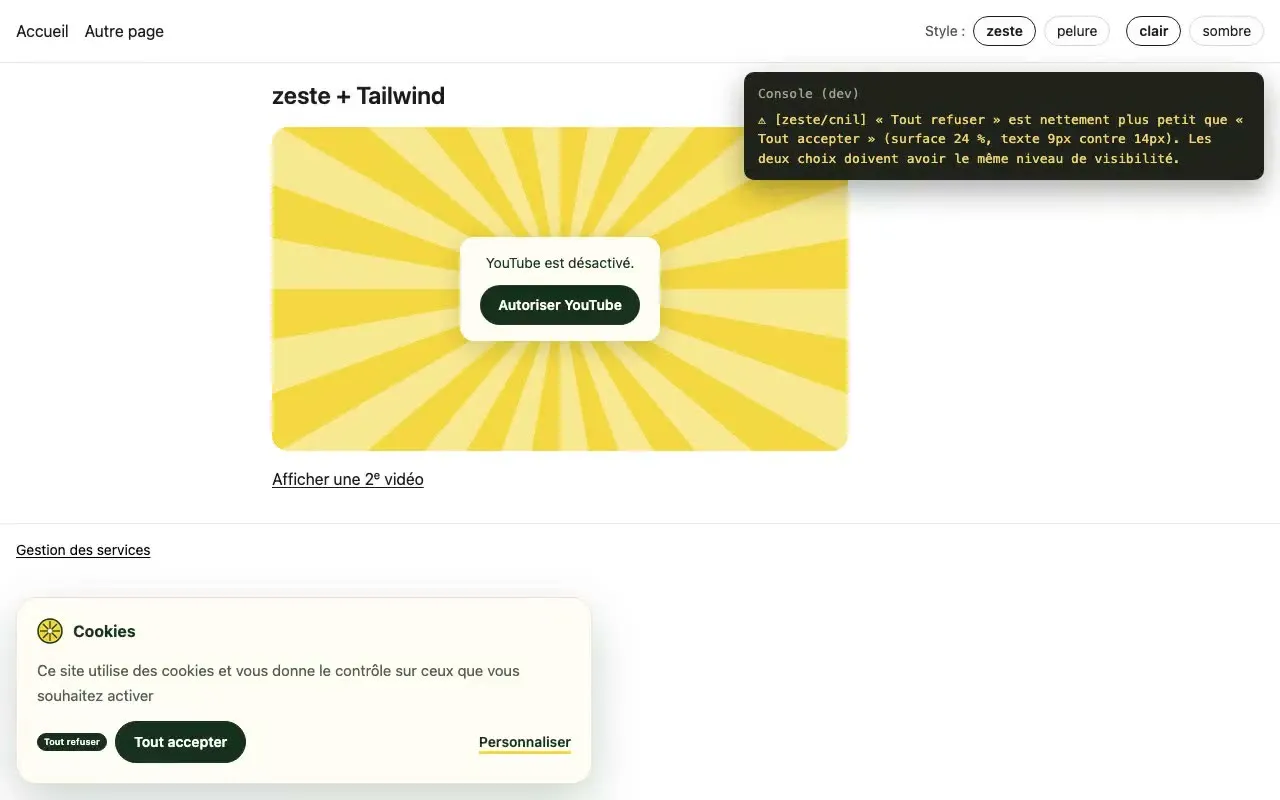
⚠ [zeste/consent] "Deny all" is much smaller than "Accept all" (area 24%, text 9px vs 14px). Both choices must be equally prominent.
The guard also warns when “Deny all” is missing, hidden or hard to read, and when nothing lets the visitor reopen the preferences. These checks do not replace a legal review.
Keeping a record of each choice
createZeste({
  services,
  policyVersion: '2026-10',
  onRecord: (record) =>
    navigator.sendBeacon('/consent', JSON.stringify(record)),
});
// record = {
//   id: '9f2c…', date: '2026-10-09T14:03:12Z',
//   action: 'denyAll', policyVersion: '2026-10',
//   choices: { gtag: false, youtube: false },
// }
The identifier is random and tied to one browser. When a returning visitor’s choice is read from the cookie, nothing is sent. Without a framework, put the same option in window.zesteConfig.
Moving a site from tarteaucitron
We moved an example site with its own design system, built on Ark UI, from tarteaucitron to zeste. Its visitors kept their choices, because zeste reads the same cookie as tarteaucitron.
On a site without a framework, replace tarteaucitron’s <script> tag with zeste’s, in the same place. Keep tarteaucitron.init, tarteaucitron.user and tarteaucitron.job as they are. Links to #tarteaucitron and the youtube_player markup keep working.
- Remove tarteaucitron and declare the same services
The site loses two
<script>tags. The configuration, such asgtagUa, moves to TypeScript. The old.youtube_playermarkup keeps working. - Run
npx @zeste/cli addThe generated banner and preferences work right away.
- Use the design system’s components
The site’s
Watch for button components that do not pass their props to the HTML element. Clicks then do nothing, and only the guard reports it.Button,ModalandTogglereplace the generated elements. - Put videos behind
<ConsentGate>The server renders the placeholder, in the site’s style.
How zeste is tested
The project runs 625 tests. Playwright drives Chromium on the built example apps, and nothing is mocked in the page. Behavior is tested once per UI library, and appearance once per style and theme.
| What is tested | How | Tests |
|---|---|---|
| The 247 catalog services | With the network intercepted, no request leaves before consent, and each service has a visible effect once accepted. | 247 |
| GA4, YouTube, Matomo Cloud | On the real network, with the real scripts. The _ga cookies appear on acceptance and disappear on withdrawal. | 6 |
| The generated components | Svelte, React and Vue with 3 UI libraries each. Keyboard use, preferences and withdrawal once per library. Accessibility with axe, theme and equal buttons in both styles, light and dark. The guard once per framework. | 174 |
| The same app six times | SvelteKit, Next.js, Nuxt, and each framework without a server, including React 18. Navigation, withdrawal and the guard everywhere, server rendering in the three apps that have it. | 81 |
| The migrated site | Choices made under tarteaucitron are kept and the design system still works. | 15 |
| The script version | A plain HTML site. Accessibility, keyboard use, withdrawal, the guard, a tarteaucitron configuration used as is, downloads limited to the declared services, a consent record on each choice. | 13 |
| Automatic language | A browser in German, in Norwegian, and in a language without a translation. Only one language is downloaded. | 5 |
| Engine, catalog, bindings, CLI | Unit tests, including @zeste/cli init on an old PHP site and a check that the examples match what @zeste/cli add generates. | 84 |
Project status
The library works, is tested and published on npm.
Done
- The engine, the full catalog and the texts in 36 languages.
- Bindings for Svelte 5, React 18 and 19, and Vue 3, with or without server rendering (SvelteKit, Next.js, Nuxt).
- A CLI that generates components for 3 frameworks and 3 UI libraries in two styles, and
@zeste/cli init, which finds the services a project already uses. - A script version for sites without a framework, which replaces tarteaucitron.js and keeps its configuration.
- Automatic language, from the page then the browser, among 36.
- A record of each choice, ready to send to your server as proof of consent.
- The compliance guard in development.
- Migration from tarteaucitron without losing visitors’ choices.
- Packages and CLI published on npm under the @zeste scope.
Next
- Banner buttons that work without JavaScript, for very slow connections.
- Tests on Firefox and Safari.
Questions
Do I still need to load tarteaucitron.js?
No. zeste reuses its service catalog and its translations, and replaces its engine and its interface. The tarteaucitron script is never loaded.
Will my visitors see the banner again after the move?
No. zeste reads and writes the same cookie as tarteaucitron, so the choices already made stay valid.
My design system is not Bits UI, Ark UI or shadcn. Can I use zeste?
Yes. Start from the closest generated variant and replace the imports with your components. zeste’s actions work on any button that passes its props to its HTML element: {@attach zeste.actions.denyAll} in Svelte, {...zeste.actions.denyAll} in React and v-bind="zeste.actions.denyAll" in Vue. A plain click handler on zeste.denyAll also works, but the guard cannot check that button.
Does zeste make my site compliant?
Not on its own, and no tool can. zeste applies strict defaults and checks what can be measured, such as requests before consent, button visibility and the link to change one’s choice. Your texts, your privacy policy and the purpose of each cookie still need a review.
How does it compare with tarteaucitron Pro?
tarteaucitron Pro is a hosted service with a dashboard and a consent log. zeste is a library that runs inside your project. For a consent log, zeste passes each choice to your code through onRecord, and you send it to your own server.
My site has no framework. Can I use zeste?
Yes. One <script> tag adds a banner, preferences and placeholders, in two styles. On a site that already uses tarteaucitron, replace its tag and zeste reads the existing configuration.
Does it work with React and Vue?
Yes. @zeste/react supports React 18 and 19 and Next.js, and @zeste/vue supports Vue 3 and Nuxt. Both have the same API as @zeste/svelte, and zeste add generates components for Radix, Reka UI, Ark UI and shadcn. For other frameworks, the engine (@zeste/core) and the catalog work without one.
What is the license?
MIT, like tarteaucitron.js. The service catalog and the translations come from tarteaucitron.js, Copyright AmauriC.